
Let your AI agent
manage your servers
ZShell is an SSH terminal, SFTP client, and MCP server in one app. Connect Claude, Cursor, or any AI agent straight to your hosts — it can run commands, manage files, and watch your servers, while you stay in control.
Looking for Zsh configs and shell setups? Zsh & server terminal guide →
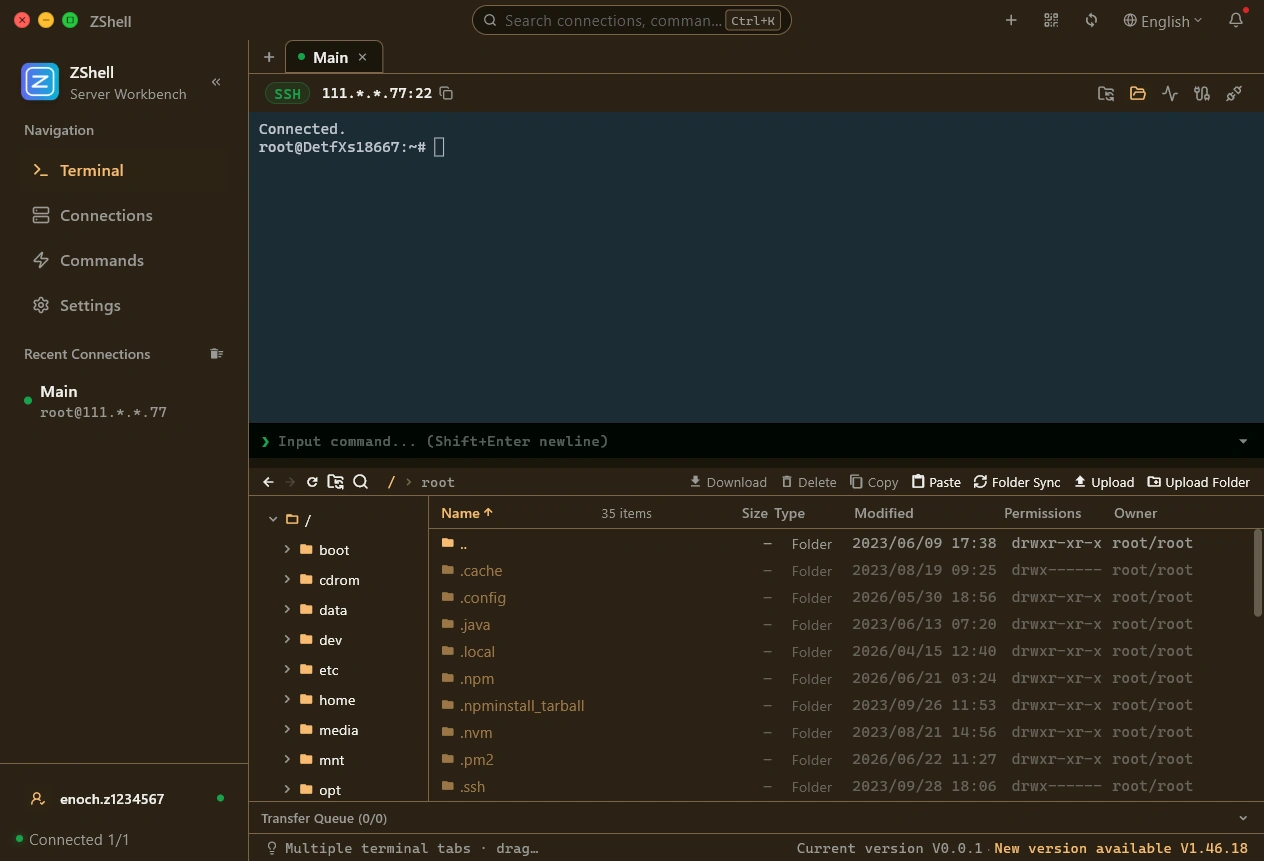
Let AI work on your servers
ZShell ships a built-in MCP (Model Context Protocol) server that runs locally inside the app. It exposes your connected hosts as tools to any MCP-compatible AI agent.
- ✓ Built-in MCP server
A Model Context Protocol server runs inside the app on localhost and exposes your hosts as tools to any MCP-compatible agent.
- ✓ Run shell commands
Agents execute commands on your remote servers and receive the full output — just as if you had typed them into the terminal.
- ✓ Manage files over SFTP
Read, write, upload, and download files on any connected host through dedicated MCP file tools.
- ✓ Live server snapshots
A monitoring tool hands agents a real-time view of CPU, memory, disk, load, and top processes on any host.
- ✓ Approval you control
Dangerous commands are always blocked; grant a timed trust window to auto-approve routine ones, and review every action in the audit log.
Everything you need to run your servers
ZShell packs the essentials of daily server operations into one clean desktop app. Advanced ops are available with Pro.
Fast SSH Terminal
Low-latency interactive shell with multiple tabs, command history, and quick commands.
SFTP File Manager
Dual-pane file browsing, batch transfers with pause/resume, and remote file editing.
Drag-and-Drop File Transfer
Drag files between your desktop and the remote host for quick, effortless uploads and downloads.
In-Place Text Preview
Open remote text files instantly in a read-only viewer — no download required.
Multi-Session Tabs
Run many connections side by side, duplicate tabs without re-authenticating, and keep session state across restarts.
Split Terminal Panes (Multi-Pane)
Split a tab into multiple terminal panes on the same host — panes share the authenticated connection, no re-login.
Server Monitor
Live CPU, memory, disk, and network dashboards with configurable polling.
Host Insights
Every saved host shows its OS, kernel, CPU cores, and memory; add notes and filter the list.
Advanced Process Control
Kill, pause, resume, and renice processes. View env, open files, and process trees.
Smart History
Unlimited command and path history with fuzzy search, grouped per host.
Command Autocomplete
Type-ahead completion for command names, history, and remote paths in the quick-input bar.
Proxy Jump
Multi-hop SSH proxy chain (ProxyJump) to reach hosts behind firewalls.
Command Library
68 built-in ops commands in 9 languages, synced and signature-verified.
Terminal Themes
Curated color schemes (Dracula, Solarized, One Dark...) plus custom palettes.
Secure by Design
Ed25519-verified updates, host-key & certificate verification, 2FA, and end-to-end encrypted sync.
MCP Server for AI Agents
Expose terminal, SFTP, and monitoring tools to Claude, Cursor, and other MCP-ready agents through a local server.
Cloud Sync
Sync hosts, keys, and command history across devices with end-to-end encryption.
Multi-Device Pairing
Pair up to 3 devices with secure codes and temporary sessions.
Two-Way Folder Sync
Bidirectional folder sync with per-directory settings, conflict policies, hidden-file filtering, and background continuation.
Smart Packed Transfers
Auto-pack large uploads and sync batches into one compressed stream, with per-file fallback.
SFTP Full-Text Search
Recursively find files and folders by name, with fuzzy or exact matching.
Network Monitoring
Listening ports, per-process connections, and live per-process up/down rates.
See ZShell in action
A quick tour of the workbench — terminal, file manager, monitoring, and more.